WhatsApp campaigns, done properly.
Send from several numbers at once, build your contact lists, warm new numbers before you use them, and answer incoming messages automatically — from one desktop app that runs on your own machine.
Windows · English, Spanish and Portuguese · your data stays on your computer
What it does
Everything a WhatsApp campaign needs, in one place
No browser extensions, no scripts to install, no monthly platform to log into.
Multiple accounts
Link several WhatsApp numbers and send from all of them. Each runs independently, so one having trouble never stops the rest.
Messages that vary
Variants, spintax and placeholders mean no two people get the same text. More human to read, and far less likely to be flagged.
Human pacing
Random delays, rest periods and account rotation. Set it to behave like a person, not a machine.
Number filtering
Check which numbers actually have WhatsApp before you spend a campaign on them, and see which are business accounts.
Group tools
List your groups, extract members, collect invite links and join carefully — at a pace that will not get a number flagged.
Account warmer
Your own numbers message each other at natural intervals, so a new number has ordinary traffic behind it before its first campaign.
Auto reply
Answer with keyword rules and attachments, or let Claude, OpenAI, Gemini or DeepSeek reply using your own API key.
Attachments
Images, video, voice notes, PDF, Word, Excel and PowerPoint — each sent with the right type so it arrives as a proper file.
Your data, your machine
Accounts, contacts and messages are stored on your computer. Nothing is uploaded to us.
How it works
Link, warm, send
1. Link your numbers
Scan a QR code, or type an 8-digit pairing code into your phone. Each number becomes an account you can send from.
- Runs on your own machine, not a shared server
- Optional proxy per account
- Sessions stay linked between restarts

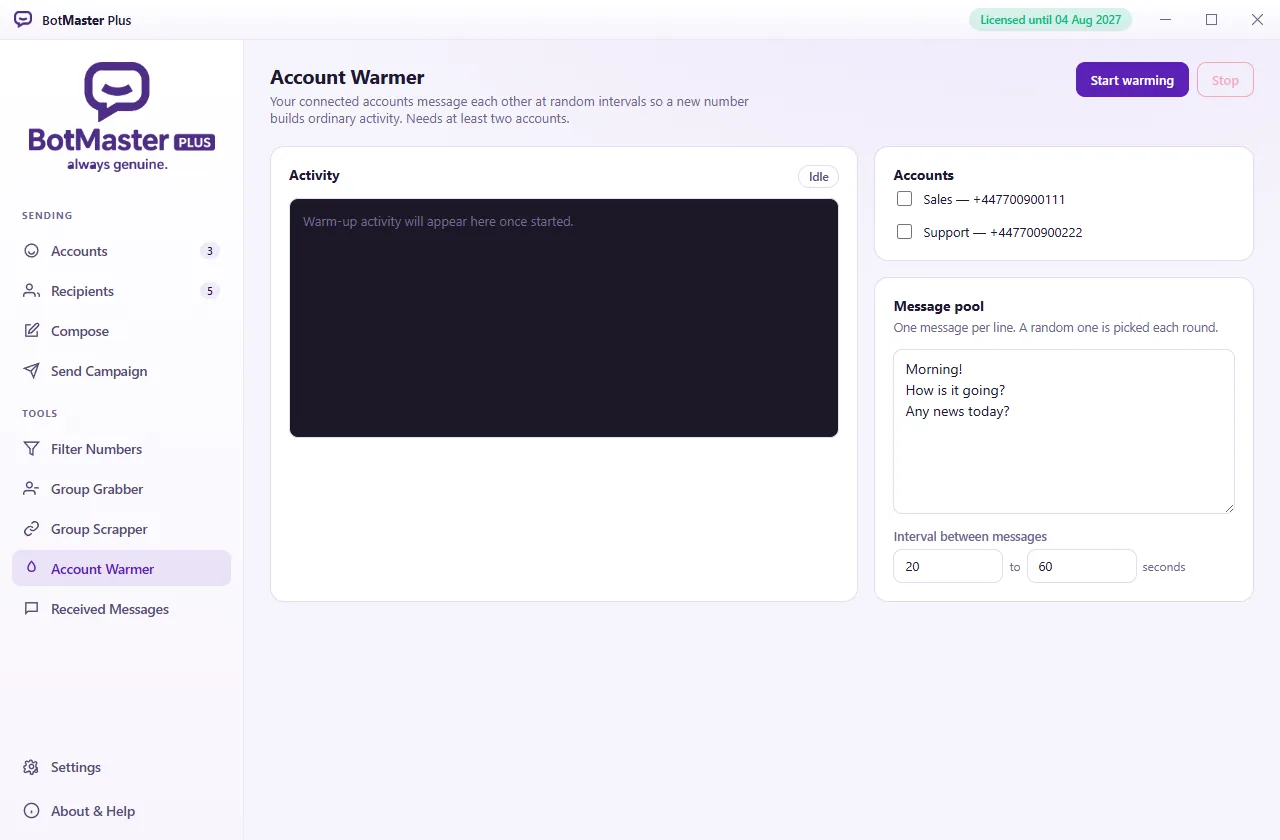
2. Warm a new number
Brand new numbers that suddenly send a hundred messages get banned. The warmer has your accounts talk to each other for a few days first.
- Random intervals you control
- Runs quietly in the background
- The single most effective way to keep a number alive
3. Send and watch
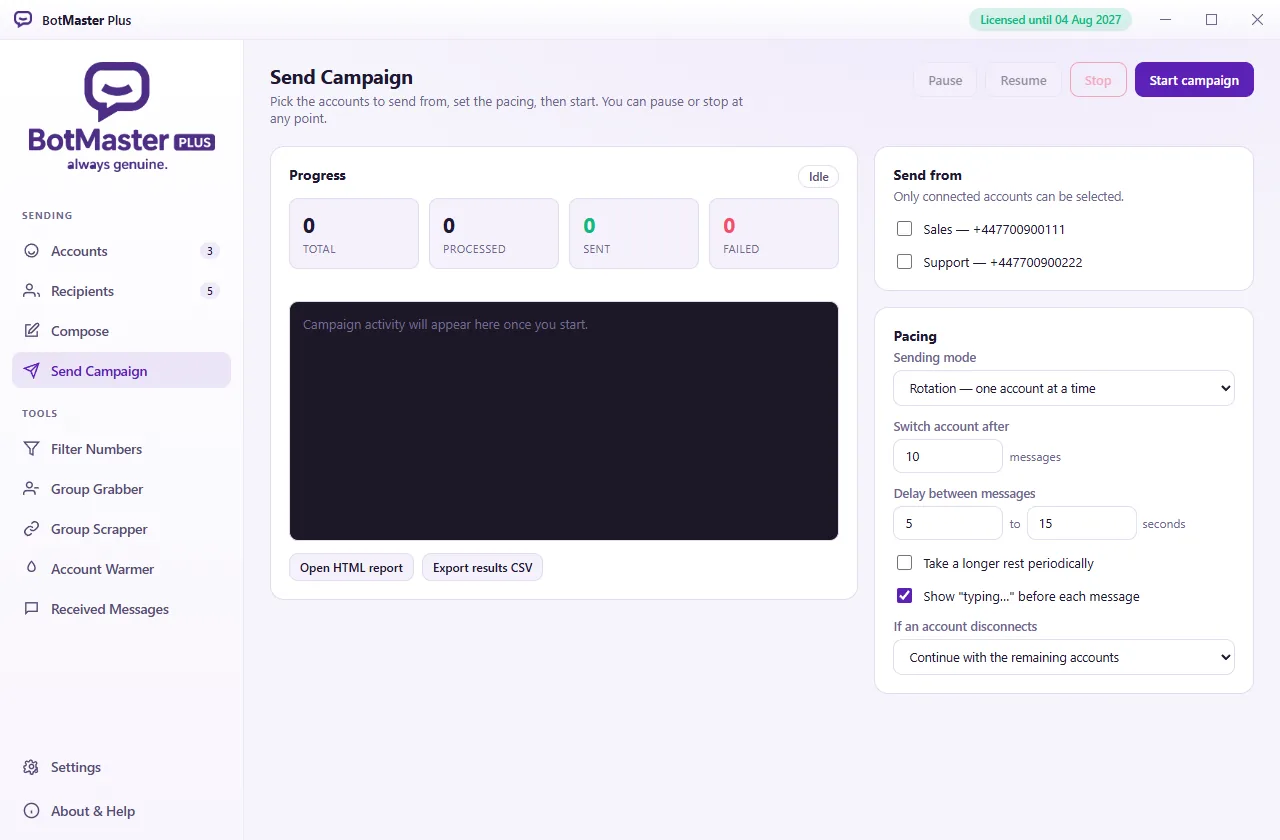
Pick your accounts, set the pacing, and start. A live log shows every message, and a full report is written when it finishes.
- Rotation or simultaneous sending
- Pause, resume or stop at any point
- HTML report and CSV of every result
See BotMaster Plus on screen
More videos on our YouTube channel.
Pricing
BotMaster Plus pricing — three editions
One licence covers one computer. Prices in US dollars — the User edition is a one-time payment, reseller and distributor editions are per year.
User
For running your own campaigns.
- The full application
- Multiple WhatsApp accounts
- Campaigns, filtering and group tools
- Account warmer
- Auto reply, rules or AI
- Updates included
- Pay with PayPal, key issued instantly
- Cannot issue licences
Reseller
For selling BotMaster Plus to your own customers.
- Everything in User
- Access to the reseller panel
- Issue licences to your customers
- Set each customer's features and expiry
- Suspend or revoke a licence at any time
- See who is active, and when they last used it
- Cannot create other resellers
Distributor
For building and running your own reseller network.
- Everything in Reseller
- Create resellers beneath you
- Set each reseller's licence allowance
- See your whole network in one place
- Full reporting across every licence you own
- Priority support
Not sure which fits? Message us and we will tell you honestly.
Questions
Frequently asked questions
Will my number get banned?
It can. Any tool that sends at volume carries that risk, and anyone who tells you otherwise is selling you something. What decides it is how you use it: message people who agreed to hear from you, warm new numbers first, keep the pacing human, and build up slowly. The app is built to make all of that easy — but the outcome is in your hands, not ours.
How many computers can I use one licence on?
One. A licence is tied to the machine it is activated on. Moving to a different computer means a new key — message us and we will sort it out.
Does it need to stay connected to the internet?
To send, yes. The licence itself is checked periodically, but the app keeps working for a grace period if it cannot reach us, so an outage on our side or a few days offline will not stop you.
Where is my data kept?
On your own computer. Your accounts, contacts, messages and reports never leave it. Checking your licence sends only your machine identifier and the version you are running.
What is the difference between Reseller and Distributor?
A reseller issues licences to end customers. A distributor does that too, and can also create resellers beneath them and set how many licences each one may issue.
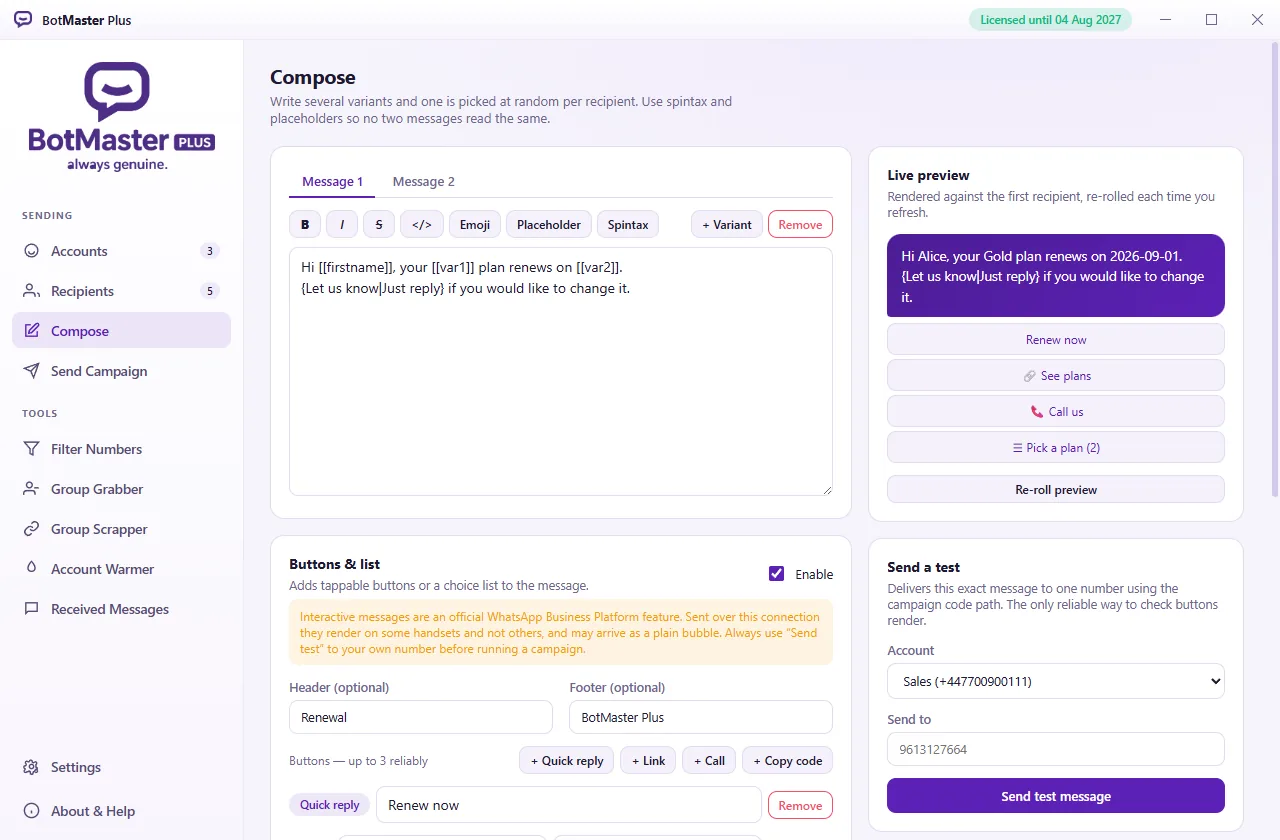
Do buttons and choice lists work?
Sometimes. They are built in and two formats are offered, but whether they render depends on the recipient's handset — on some they arrive as a plain message. The app has a test panel to check against your own phone before you rely on them. We would rather say this plainly than let you find out afterwards.
Does the licence expire?
The User edition is a one-time payment and does not expire. Reseller and Distributor editions are yearly; when the year is up the panel stops issuing until renewed, and every licence already issued to customers keeps working. Your accounts, contacts and settings stay exactly where they are either way.
Using this responsibly. Sending unsolicited bulk messages is against WhatsApp's Terms of Service and is the fastest way to get a number banned. How this software is used is entirely the user's responsibility, including compliance with WhatsApp's terms and the laws of your country covering consent, marketing and personal data.
MediaPlus accepts no responsibility or liability for banned, blocked or restricted numbers, or for any loss arising from use or misuse of this software. No result is guaranteed.
BotMaster Plus is an independent product. It is not affiliated with, endorsed by, sponsored by or connected to WhatsApp LLC or Meta Platforms, Inc. WhatsApp is a trademark of its respective owner.